> ## Documentation Index
> Fetch the complete documentation index at: https://www.mellowtel.com/docs/llms.txt
> Use this file to discover all available pages before exploring further.
# Submit extension to Firefox Add-ons
After importing Mellowtel into your extension as outlined in the [Quick Start](/browser-plugin/quickstart) guide, follow these steps to submit your extension to Firefox Add-ons.
### Step 1: Upload Your Add-on
1. Go to the [Add-ons Developer Hub](https://addons.mozilla.org/developers/).
2. Click "Submit a New Add-on".
3. You'll see this page:
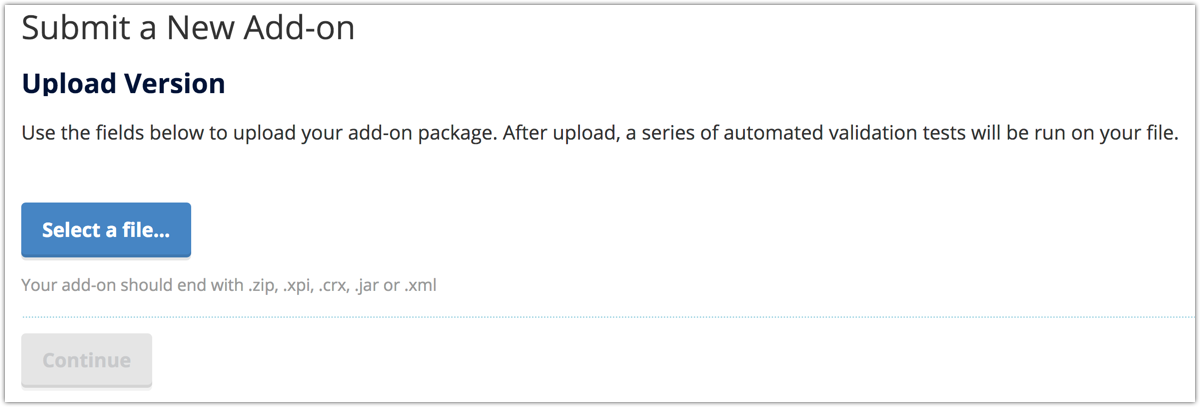 4. Click "Select a file..." and choose your add-on file (.zip, .xpi, .crx, .jar, or .xml).
5. Click "Continue" and wait for the validation to complete.
### Step 2: Submit Source Code
After validation, you'll be asked about submitting source code:
4. Click "Select a file..." and choose your add-on file (.zip, .xpi, .crx, .jar, or .xml).
5. Click "Continue" and wait for the validation to complete.
### Step 2: Submit Source Code
After validation, you'll be asked about submitting source code:
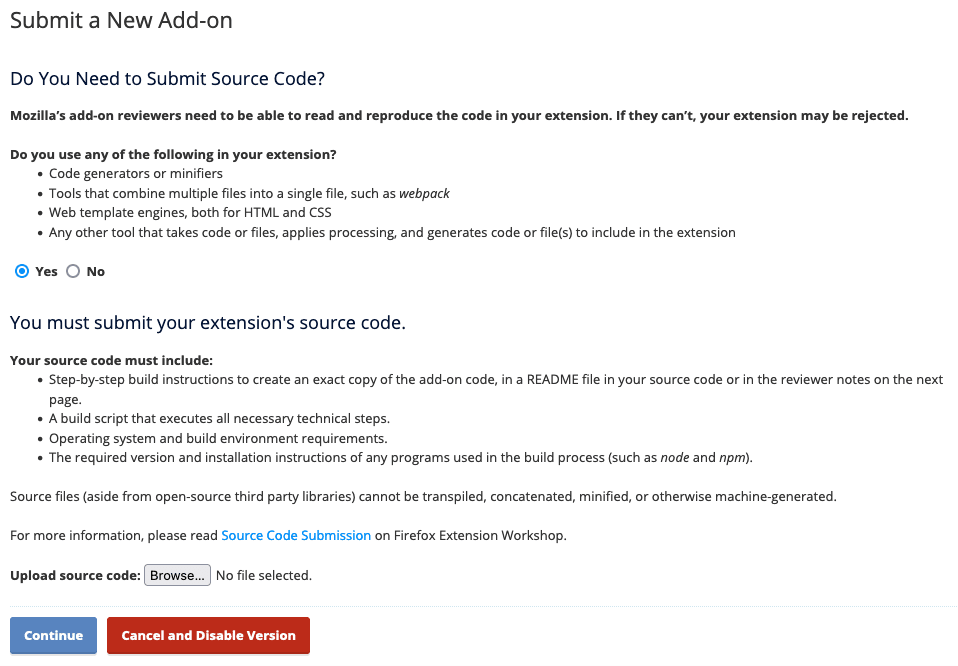 1. Select "Yes" to the question "Do you need to submit source code?".
2. Prepare a ZIP file containing:
* Step-by-step build instructions (in a README file or reviewer notes)
* A build script that executes all necessary technical steps
* Operating system and build environment requirements
* Required version and installation instructions for any programs used in the build process
3. Click "Browse..." and upload your source code ZIP file.
4. Click "Continue".
### Step 3: Describe Your Add-on
Fill out the details about your add-on:
1. Select "Yes" to the question "Do you need to submit source code?".
2. Prepare a ZIP file containing:
* Step-by-step build instructions (in a README file or reviewer notes)
* A build script that executes all necessary technical steps
* Operating system and build environment requirements
* Required version and installation instructions for any programs used in the build process
3. Click "Browse..." and upload your source code ZIP file.
4. Click "Continue".
### Step 3: Describe Your Add-on
Fill out the details about your add-on:
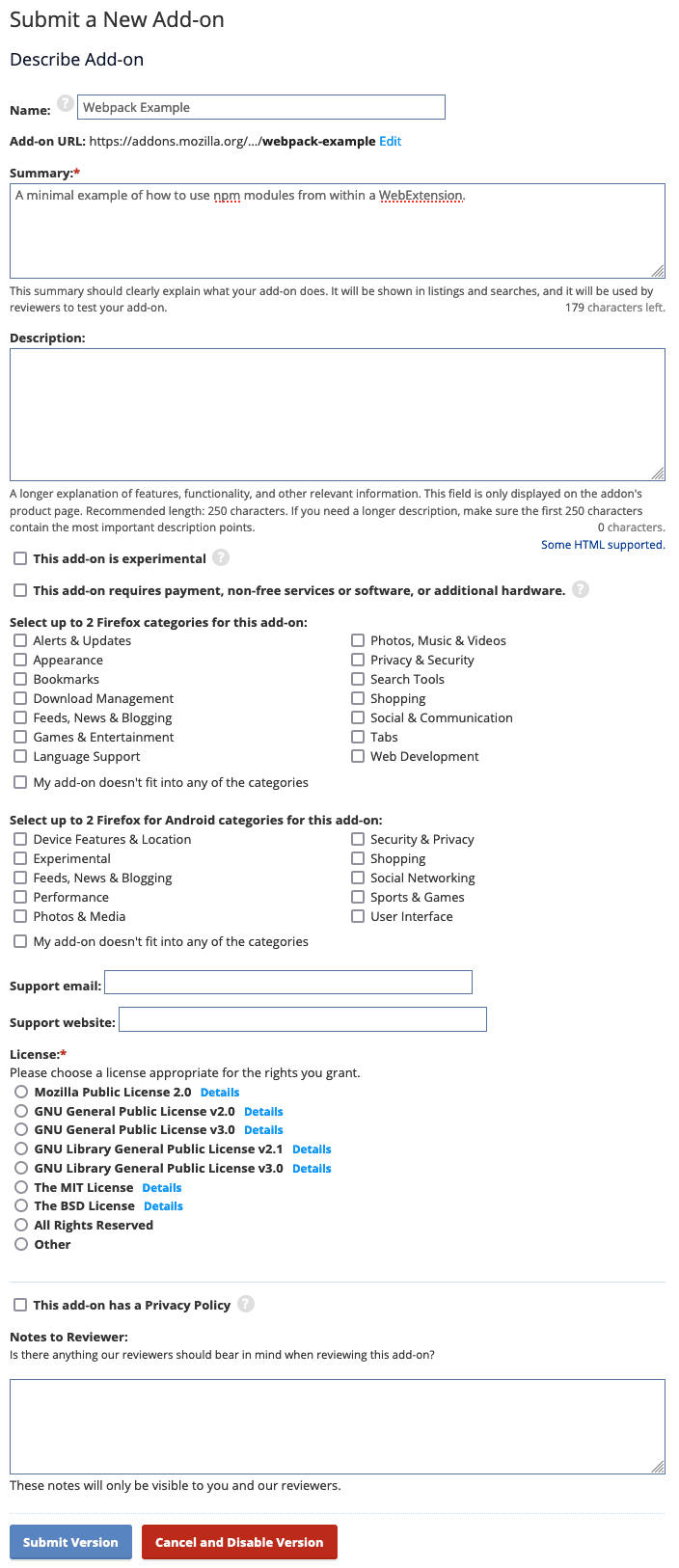 1. Name: Enter your add-on's name
2. Add-on URL: This will be auto-generated, but you can edit it
3. Summary: Provide a clear, concise explanation of what your add-on does (max 179 characters)
4. Description: A longer explanation of features and functionality (recommended 250 characters)
5. Select up to 2 Firefox categories and 2 Firefox for Android categories
6. Support email and Support website
7. Choose a License
8. If your add-on has a privacy policy, check the box and provide the policy
9. Notes for Reviewers: Explain that your add-on uses Mellowtel and provide any necessary context
### Step 4: Submit Version
After filling out all required fields, click "Submit Version" at the bottom of the page.
### After Submission
* You'll receive an email confirmation.
* Your add-on will be published on AMO but may be subject to further review.
* To update your add-on in the future, visit its page on AMO and upload the new version there.
Note: Firefox's review process may take several days to complete. Respond promptly to any questions from the review team.
1. Name: Enter your add-on's name
2. Add-on URL: This will be auto-generated, but you can edit it
3. Summary: Provide a clear, concise explanation of what your add-on does (max 179 characters)
4. Description: A longer explanation of features and functionality (recommended 250 characters)
5. Select up to 2 Firefox categories and 2 Firefox for Android categories
6. Support email and Support website
7. Choose a License
8. If your add-on has a privacy policy, check the box and provide the policy
9. Notes for Reviewers: Explain that your add-on uses Mellowtel and provide any necessary context
### Step 4: Submit Version
After filling out all required fields, click "Submit Version" at the bottom of the page.
### After Submission
* You'll receive an email confirmation.
* Your add-on will be published on AMO but may be subject to further review.
* To update your add-on in the future, visit its page on AMO and upload the new version there.
Note: Firefox's review process may take several days to complete. Respond promptly to any questions from the review team.