> ## Documentation Index
> Fetch the complete documentation index at: https://www.mellowtel.com/docs/llms.txt
> Use this file to discover all available pages before exploring further.
# Opt In / Opt Out
> Users must explicitly consent before any bandwidth is shared, and can revoke consent at any time
## What it is
Mellowtel will not share a single byte of bandwidth until the user has explicitly opted in, and the user must always have an obvious way to opt back out. This is a hard requirement of the SDK and a hard requirement of every browser store policy that allows Mellowtel-based extensions.
## Why it matters
It's the user's bandwidth. Anything less than explicit, revocable consent is both unethical and grounds for store removal. The SDK is designed so the *easy* path is also the *compliant* path. If you follow the recommended implementation, you cannot accidentally ship a version that activates without consent.
## How it works
On first install (and on any update that newly introduces Mellowtel) you must show the user a non-dismissible disclaimer that explains what Mellowtel does, then capture their choice. From then on, a settings link must be reachable from somewhere obvious in your UI so they can change their mind.
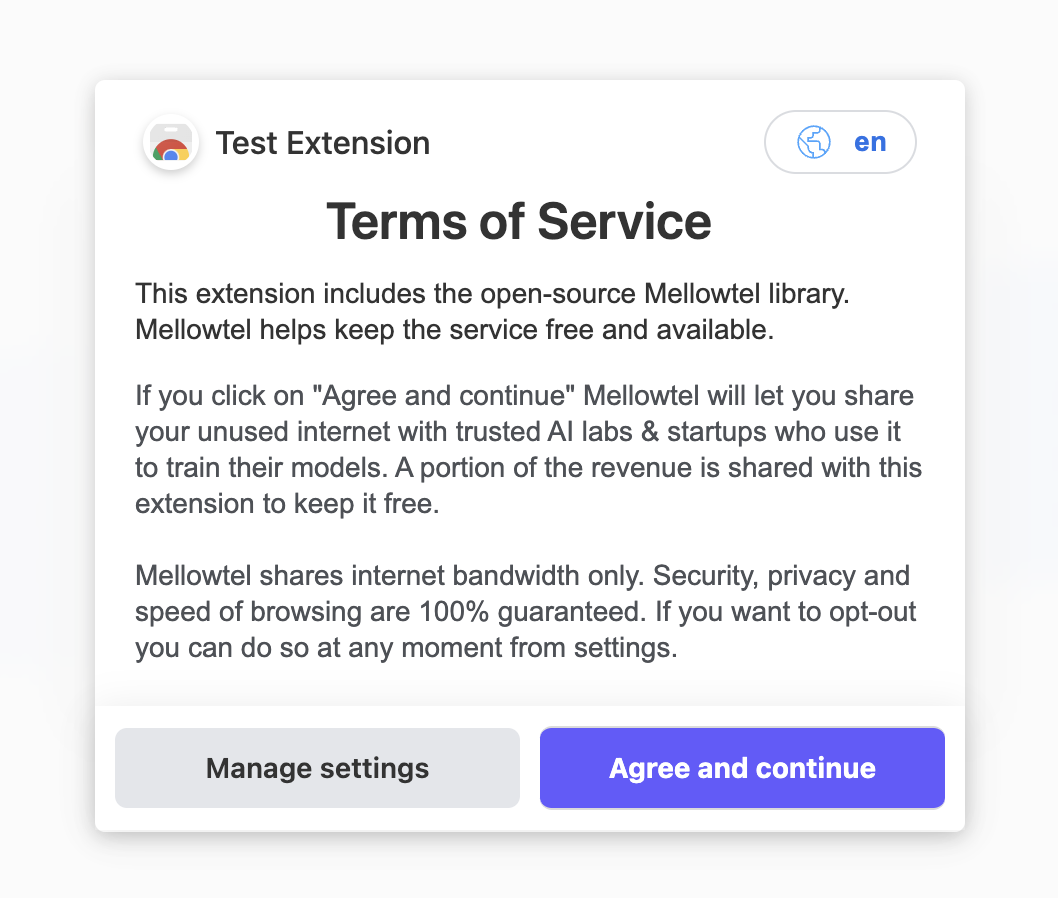 You have two implementation options:
1. **Recommended:** open the pre-built Mellowtel opt-in page with `generateAndOpenOptInLink()`. One method call, fully compliant, maximizes opt-in conversion.
2. **Custom UI:** build your own consent surface and call `optIn()` / `optOut()` yourself.
## API surface
| Method | Returns | Use it to |
| ---------------------------- | ------------------ | ----------------------------------------------------------------------- |
| `generateAndOpenOptInLink()` | `Promise` | Open the hosted opt-in page (recommended path). |
| `getOptInStatus()` | `Promise` | Check whether the user has already opted in. |
| `optIn()` | `Promise` | Record consent from your own UI. |
| `optOut()` | `Promise` | Revoke consent from your own UI. |
| `start()` | `Promise` | Begin serving requests after opt-in. |
| `generateSettingsLink()` | `Promise` | URL to the hosted settings page so users can change their choice later. |
All methods are accessible from any part of your extension: popup, content script, or background script.
## Recommended implementation
The full integration walkthrough lives in the platform quickstarts. They show where to put the SDK, how to wire it into the install/update lifecycle, and how to test it:
* [Browser plugins quickstart](/browser-plugins/quickstart)
* [Desktop app quickstart](/desktop-app/quickstart)
* [Website quickstart](/website/quickstart)
* [Mobile app quickstart](/mobile-app/quickstart)
In short, after `new Mellowtel(...)` and `initBackground()`, call `generateAndOpenOptInLink()` from your install/update handler. That's it.
## Custom UI
If you want full control over the consent surface, capture the user's choice in your own UI and forward it to the SDK:
```javascript theme={null}
// User agreed
await mellowtel.optIn();
await mellowtel.start();
// User declined or later revoked
await mellowtel.optOut();
// Check status (e.g. to render a toggle)
const hasOptedIn = await mellowtel.getOptInStatus();
```
Whatever UI you build, it must:
1. Be non-dismissible on first install.
2. Default to opted *out* until the user actively agrees.
3. Be re-openable from somewhere obvious in your product so users can change their choice.
## Settings link
Users must always have an easy way to change their settings. Use `generateSettingsLink()` to get a URL to the hosted settings page and place it somewhere persistent: your popup, an options page, an account screen.
```javascript theme={null}
const settingsUrl = await mellowtel.generateSettingsLink();
```
## Announcing Mellowtel to existing users
If you are adding Mellowtel to an extension that already has users, you need to tell them what changed before asking for consent. We provide a [copy-paste announcement template](/concepts/update-announcement) you can adapt.
## Related
* [Privacy](/concepts/privacy): what users are actually agreeing to share.
* [Rate Limiting](/concepts/rate-limiting): how the SDK protects users who do opt in.
You have two implementation options:
1. **Recommended:** open the pre-built Mellowtel opt-in page with `generateAndOpenOptInLink()`. One method call, fully compliant, maximizes opt-in conversion.
2. **Custom UI:** build your own consent surface and call `optIn()` / `optOut()` yourself.
## API surface
| Method | Returns | Use it to |
| ---------------------------- | ------------------ | ----------------------------------------------------------------------- |
| `generateAndOpenOptInLink()` | `Promise` | Open the hosted opt-in page (recommended path). |
| `getOptInStatus()` | `Promise` | Check whether the user has already opted in. |
| `optIn()` | `Promise` | Record consent from your own UI. |
| `optOut()` | `Promise` | Revoke consent from your own UI. |
| `start()` | `Promise` | Begin serving requests after opt-in. |
| `generateSettingsLink()` | `Promise` | URL to the hosted settings page so users can change their choice later. |
All methods are accessible from any part of your extension: popup, content script, or background script.
## Recommended implementation
The full integration walkthrough lives in the platform quickstarts. They show where to put the SDK, how to wire it into the install/update lifecycle, and how to test it:
* [Browser plugins quickstart](/browser-plugins/quickstart)
* [Desktop app quickstart](/desktop-app/quickstart)
* [Website quickstart](/website/quickstart)
* [Mobile app quickstart](/mobile-app/quickstart)
In short, after `new Mellowtel(...)` and `initBackground()`, call `generateAndOpenOptInLink()` from your install/update handler. That's it.
## Custom UI
If you want full control over the consent surface, capture the user's choice in your own UI and forward it to the SDK:
```javascript theme={null}
// User agreed
await mellowtel.optIn();
await mellowtel.start();
// User declined or later revoked
await mellowtel.optOut();
// Check status (e.g. to render a toggle)
const hasOptedIn = await mellowtel.getOptInStatus();
```
Whatever UI you build, it must:
1. Be non-dismissible on first install.
2. Default to opted *out* until the user actively agrees.
3. Be re-openable from somewhere obvious in your product so users can change their choice.
## Settings link
Users must always have an easy way to change their settings. Use `generateSettingsLink()` to get a URL to the hosted settings page and place it somewhere persistent: your popup, an options page, an account screen.
```javascript theme={null}
const settingsUrl = await mellowtel.generateSettingsLink();
```
## Announcing Mellowtel to existing users
If you are adding Mellowtel to an extension that already has users, you need to tell them what changed before asking for consent. We provide a [copy-paste announcement template](/concepts/update-announcement) you can adapt.
## Related
* [Privacy](/concepts/privacy): what users are actually agreeing to share.
* [Rate Limiting](/concepts/rate-limiting): how the SDK protects users who do opt in.